<?xml version="1.0" encoding="utf-8"?>
<feed xmlns="http://www.w3.org/2005/Atom">
	<title type="html"><![CDATA[Форум Рутокен &mdash; driverpackagepreinstall Код Ошибки 87]]></title>
	<link rel="self" href="https://forum.rutoken.ru/feed/atom/topic/2304" />
	<updated>2015-09-10T13:48:34Z</updated>
	<generator>PunBB</generator>
	<id>https://forum.rutoken.ru/topic/2304/</id>
		<entry>
			<title type="html"><![CDATA[Re: driverpackagepreinstall Код Ошибки 87]]></title>
			<link rel="alternate" href="https://forum.rutoken.ru/post/8761/#p8761" />
			<content type="html"><![CDATA[<div class="quotebox"><cite>AlexxJ пишет:</cite><blockquote><p>Ключ : 16K240Z 0851606089</p></blockquote></div><p>Для данного носителя - Рутокен S, к сожалению, установка драйвера обязательна.<br />Установка драйвера будет возможна только после восстановления операционной системы (точка восстановления, обновление service pack или переустановка операционной системы).</p>]]></content>
			<author>
				<name><![CDATA[Ксения Шаврова]]></name>
				<uri>https://forum.rutoken.ru/user/8982/</uri>
			</author>
			<updated>2015-09-10T13:48:34Z</updated>
			<id>https://forum.rutoken.ru/post/8761/#p8761</id>
		</entry>
		<entry>
			<title type="html"><![CDATA[Re: driverpackagepreinstall Код Ошибки 87]]></title>
			<link rel="alternate" href="https://forum.rutoken.ru/post/8760/#p8760" />
			<content type="html"><![CDATA[<p>Ключ : 16K240Z 0851606089</p>]]></content>
			<author>
				<name><![CDATA[AlexxJ]]></name>
				<uri>https://forum.rutoken.ru/user/9870/</uri>
			</author>
			<updated>2015-09-10T12:06:24Z</updated>
			<id>https://forum.rutoken.ru/post/8760/#p8760</id>
		</entry>
		<entry>
			<title type="html"><![CDATA[Re: driverpackagepreinstall Код Ошибки 87]]></title>
			<link rel="alternate" href="https://forum.rutoken.ru/post/8759/#p8759" />
			<content type="html"><![CDATA[<p>Ошибка установки драйвера, скорее всего, связана с повреждением операционной системы. </p><p>Укажите, пожалуйста, буквенно-цифровой код, указанный на борту носителя Рутокен.</p>]]></content>
			<author>
				<name><![CDATA[Ксения Шаврова]]></name>
				<uri>https://forum.rutoken.ru/user/8982/</uri>
			</author>
			<updated>2015-09-10T11:54:49Z</updated>
			<id>https://forum.rutoken.ru/post/8759/#p8759</id>
		</entry>
		<entry>
			<title type="html"><![CDATA[Re: driverpackagepreinstall Код Ошибки 87]]></title>
			<link rel="alternate" href="https://forum.rutoken.ru/post/8758/#p8758" />
			<content type="html"><![CDATA[<div class="quotebox"><cite>Ксения Климанова пишет:</cite><blockquote><div class="quotebox"><cite>AlexxJ пишет:</cite><blockquote><p>та же ошибка</p></blockquote></div><p>1.Запустите проверку системных файлов операционной системы через Командную строку с правами администратора и отключенным UAC: <strong>sfc /scannow</strong>. При проверке может потребоваться установочный диск ОС; <br />2.Установите последнюю версию драйверов в соответствии с разрядностью ОС с нашего сайта </p><p>P.S.: Командная строка запускается так: &quot;Пуск&quot; - &quot;Выполнить&quot;(&quot;строка поиска&quot;) - cmd (правой кнопкой мыши &quot;Запуск от имени Администратора&quot;)</p></blockquote></div><br /><p>на 54% вышло сообщение:<br />Программа защиты ресурсов Windows обнаружила поврежденные файлы, но не<br />может восстановить некоторые из них. Подробные сведения см. в файле CBS.Log, кот<br />орый находится по следующему пути: windir\Logs\CBS\CBS.log. Например,<br />C:\Windows\Logs\CBS\CBS.log. Обратите внимание, что ведение журнала<br />в настоящее время не поддерживается для автономного обслуживания.</p><p>в журнале последние строки с ошибками :</p><p>2015-09-10 13:41:30, Info&nbsp; &nbsp; &nbsp; &nbsp; &nbsp; &nbsp; &nbsp; &nbsp; &nbsp; CSI&nbsp; &nbsp; 000003cf [SR] Beginning Verify and Repair transaction<br />2015-09-10 13:41:33, Error&nbsp; &nbsp; &nbsp; &nbsp; &nbsp; &nbsp; &nbsp; &nbsp; &nbsp;CSI&nbsp; &nbsp; 000003d0 (F) STATUS_OBJECT_NAME_NOT_FOUND #4325822# from Windows::Rtl::SystemImplementation::DirectFileSystemProvider::SysCreateFile(flags = (AllowSharingViolation), handle = {provider=NULL, handle=0, name= (&quot;null&quot;)}, da = (SYNCHRONIZE|FILE_READ_ATTRIBUTES), oa = @0x5106ec288-&gt;OBJECT_ATTRIBUTES {s:48; rd:NULL; on:[94]&quot;\??\C:\Windows\WinSxS\amd64_netathrx.inf_31bf3856ad364e35_6.2.9200.16384_none_cbd5fabae1c7796a&quot;; a:(OBJ_CASE_INSENSITIVE)}, iosb = @0x5106ec268, as = (null), fa = 0, sa = (FILE_SHARE_READ|FILE_SHARE_WRITE|FILE_SHARE_DELETE), cd = FILE_OPEN, co = (FILE_SYNCHRONOUS_IO_NONALERT|0x00004000), eab = NULL, eal = 0, disp = Invalid)<br />[gle=0xd0000034]<br />2015-09-10 13:41:33, Error&nbsp; &nbsp; &nbsp; &nbsp; &nbsp; &nbsp; &nbsp; &nbsp; &nbsp;CSI&nbsp; &nbsp; 000003d1@2015/9/10:09:41:33.506 (F) base\wcp\sil\merged\ntu\ntsystem.cpp(2155): Error STATUS_OBJECT_NAME_NOT_FOUND originated in function Windows::Rtl::SystemImplementation::DirectFileSystemProvider::SysCreateFile expression: (null)<br />[gle=0x80004005]<br />2015-09-10 13:41:33, Info&nbsp; &nbsp; &nbsp; &nbsp; &nbsp; &nbsp; &nbsp; &nbsp; &nbsp; CBS&nbsp; &nbsp; Added C:\Windows\Logs\CBS\CBS.log to WER report.<br />2015-09-10 13:41:33, Info&nbsp; &nbsp; &nbsp; &nbsp; &nbsp; &nbsp; &nbsp; &nbsp; &nbsp; CBS&nbsp; &nbsp; Added C:\Windows\Logs\CBS\CbsPersist_20150903075345.cab to WER report.<br />2015-09-10 13:41:33, Info&nbsp; &nbsp; &nbsp; &nbsp; &nbsp; &nbsp; &nbsp; &nbsp; &nbsp; CBS&nbsp; &nbsp; Added C:\Windows\Logs\CBS\CbsPersist_20150422092717.cab to WER report.<br />2015-09-10 13:41:33, Info&nbsp; &nbsp; &nbsp; &nbsp; &nbsp; &nbsp; &nbsp; &nbsp; &nbsp; CBS&nbsp; &nbsp; Added C:\Windows\Logs\CBS\CbsPersist_20150202090930.cab to WER report.<br />2015-09-10 13:41:33, Info&nbsp; &nbsp; &nbsp; &nbsp; &nbsp; &nbsp; &nbsp; &nbsp; &nbsp; CBS&nbsp; &nbsp; Added C:\Windows\Logs\CBS\CbsPersist_20141120160305.cab to WER report.<br />2015-09-10 13:41:33, Info&nbsp; &nbsp; &nbsp; &nbsp; &nbsp; &nbsp; &nbsp; &nbsp; &nbsp; CBS&nbsp; &nbsp; Added C:\Windows\Logs\CBS\CbsPersist_20140604043124.cab to WER report.<br />2015-09-10 13:41:33, Info&nbsp; &nbsp; &nbsp; &nbsp; &nbsp; &nbsp; &nbsp; &nbsp; &nbsp; CBS&nbsp; &nbsp; Could not get active session for current session file logging [HRESULT = 0x80004003 - E_POINTER]<br />2015-09-10 13:41:33, Info&nbsp; &nbsp; &nbsp; &nbsp; &nbsp; &nbsp; &nbsp; &nbsp; &nbsp; CBS&nbsp; &nbsp; Not able to add pending.xml to Windows Error Report. [HRESULT = 0x80070002 - ERROR_FILE_NOT_FOUND]<br />2015-09-10 13:41:33, Info&nbsp; &nbsp; &nbsp; &nbsp; &nbsp; &nbsp; &nbsp; &nbsp; &nbsp; CBS&nbsp; &nbsp; Not able to add pending.xml.bad to Windows Error Report. [HRESULT = 0x80070002 - ERROR_FILE_NOT_FOUND]<br />2015-09-10 13:41:33, Info&nbsp; &nbsp; &nbsp; &nbsp; &nbsp; &nbsp; &nbsp; &nbsp; &nbsp; CBS&nbsp; &nbsp; Not able to add SCM.EVM to Windows Error Report. [HRESULT = 0x80070002 - ERROR_FILE_NOT_FOUND]<br />2015-09-10 13:41:34, Error&nbsp; &nbsp; &nbsp; &nbsp; &nbsp; &nbsp; &nbsp; &nbsp; &nbsp;CSI&nbsp; &nbsp; 000003d2 (F) STATUS_OBJECT_NAME_NOT_FOUND #4325821# from Windows::Rtl::SystemImplementation::CDirectory::OpenExistingDirectory(...)[gle=0xd0000034]<br />2015-09-10 13:41:34, Error&nbsp; &nbsp; &nbsp; &nbsp; &nbsp; &nbsp; &nbsp; &nbsp; &nbsp;CSI&nbsp; &nbsp; 000003d3 (F) STATUS_OBJECT_NAME_NOT_FOUND #4325820# from Windows::Rtl::SystemImplementation::CDirectory_IRtlDirectoryTearoff::OpenExistingDirectory(flags = 0, da = (SYNCHRONIZE), oa = @0x5106eccc0-&gt;SIL_OBJECT_ATTRIBUTES {s:40; on:&quot;amd64_netathrx.inf_31bf3856ad364e35_6.2.9200.16384_none_cbd5fabae1c7796a&quot;; a:(OBJ_CASE_INSENSITIVE)}, sa = (FILE_SHARE_READ|FILE_SHARE_WRITE|FILE_SHARE_DELETE), oo = (FILE_DIRECTORY_FILE|FILE_SYNCHRONOUS_IO_NONALERT|FILE_OPEN_FOR_BACKUP_INTENT), dir = NULL, disp = Invalid)<br />[gle=0xd0000034]</p>]]></content>
			<author>
				<name><![CDATA[AlexxJ]]></name>
				<uri>https://forum.rutoken.ru/user/9870/</uri>
			</author>
			<updated>2015-09-10T10:48:40Z</updated>
			<id>https://forum.rutoken.ru/post/8758/#p8758</id>
		</entry>
		<entry>
			<title type="html"><![CDATA[Re: driverpackagepreinstall Код Ошибки 87]]></title>
			<link rel="alternate" href="https://forum.rutoken.ru/post/8757/#p8757" />
			<content type="html"><![CDATA[<div class="quotebox"><cite>AlexxJ пишет:</cite><blockquote><p>та же ошибка</p></blockquote></div><p>1.Запустите проверку системных файлов операционной системы через Командную строку с правами администратора и отключенным UAC: <strong>sfc /scannow</strong>. При проверке может потребоваться установочный диск ОС; <br />2.Установите последнюю версию драйверов в соответствии с разрядностью ОС с нашего сайта </p><p>P.S.: Командная строка запускается так: &quot;Пуск&quot; - &quot;Выполнить&quot;(&quot;строка поиска&quot;) - cmd (правой кнопкой мыши &quot;Запуск от имени Администратора&quot;)</p>]]></content>
			<author>
				<name><![CDATA[Ксения Шаврова]]></name>
				<uri>https://forum.rutoken.ru/user/8982/</uri>
			</author>
			<updated>2015-09-10T10:23:46Z</updated>
			<id>https://forum.rutoken.ru/post/8757/#p8757</id>
		</entry>
		<entry>
			<title type="html"><![CDATA[Re: driverpackagepreinstall Код Ошибки 87]]></title>
			<link rel="alternate" href="https://forum.rutoken.ru/post/8756/#p8756" />
			<content type="html"><![CDATA[<p>та же ошибка</p>]]></content>
			<author>
				<name><![CDATA[AlexxJ]]></name>
				<uri>https://forum.rutoken.ru/user/9870/</uri>
			</author>
			<updated>2015-09-10T10:14:12Z</updated>
			<id>https://forum.rutoken.ru/post/8756/#p8756</id>
		</entry>
		<entry>
			<title type="html"><![CDATA[Re: driverpackagepreinstall Код Ошибки 87]]></title>
			<link rel="alternate" href="https://forum.rutoken.ru/post/8755/#p8755" />
			<content type="html"><![CDATA[<div class="quotebox"><cite>AlexxJ пишет:</cite><blockquote><p>Добрый день, при установке&nbsp; драйвера v.2.100.00.0542 (x64) возникает ошибка Код ошибки 87 (0x00000057). Windoes 8x64. В чем может быть дело?</p></blockquote></div><p>Для решения сложившейся ситуации воспользуйтесь, пожалуйста, <a href="https://www.rutoken.ru/support/download/get/?fid=56">утилитой удаления &quot;старых&quot; драйверов Рутокен</a>.<br />Перезагрузите компьютер и повторите попытку установки <a href="https://www.rutoken.ru/support/download/drivers-for-windows/">последней версии драйвера</a>.<br />Сообщите, пожалуйста, о результатах.</p>]]></content>
			<author>
				<name><![CDATA[Ксения Шаврова]]></name>
				<uri>https://forum.rutoken.ru/user/8982/</uri>
			</author>
			<updated>2015-09-10T09:12:26Z</updated>
			<id>https://forum.rutoken.ru/post/8755/#p8755</id>
		</entry>
		<entry>
			<title type="html"><![CDATA[driverpackagepreinstall Код Ошибки 87]]></title>
			<link rel="alternate" href="https://forum.rutoken.ru/post/8754/#p8754" />
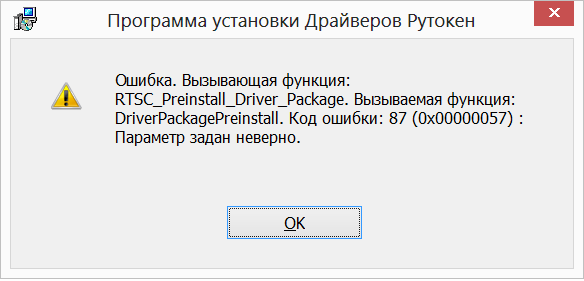
			<content type="html"><![CDATA[<p><span class="postimg"><a class="fancybox fancybox.image" rel="group" href="https://forum.rutoken.ru/uploads/transfer/0/8500/8754/p19ur2bd2j1nhj1ifemuinho1pai1.png"><img class="fb_img" src="https://forum.rutoken.ru/uploads/transfer/0/8500/8754/thumb/p19ur2bd2j1nhj1ifemuinho1pai1.png" alt="" /></a></span></p><p>Добрый день, при установке&nbsp; драйвера v.2.100.00.0542 (x64) возникает ошибка Код ошибки 87 (0x00000057). Windoes 8x64. В чем может быть дело?</p>]]></content>
			<author>
				<name><![CDATA[AlexxJ]]></name>
				<uri>https://forum.rutoken.ru/user/9870/</uri>
			</author>
			<updated>2015-09-10T08:31:06Z</updated>
			<id>https://forum.rutoken.ru/post/8754/#p8754</id>
		</entry>
</feed>
