<?xml version="1.0" encoding="utf-8"?>
<feed xmlns="http://www.w3.org/2005/Atom">
	<title type="html"><![CDATA[Форум Рутокен &mdash; MaCos - RDPWin]]></title>
	<link rel="self" href="https://forum.rutoken.ru/feed/atom/topic/3215" />
	<updated>2020-09-22T07:35:06Z</updated>
	<generator>PunBB</generator>
	<id>https://forum.rutoken.ru/topic/3215/</id>
		<entry>
			<title type="html"><![CDATA[Re: MaCos - RDPWin]]></title>
			<link rel="alternate" href="https://forum.rutoken.ru/post/14825/#p14825" />
			<content type="html"><![CDATA[<p>Здравствуйте, <strong>Аваська</strong>, <br />Вышла новая версия Драйверов Рутокен, в которой была исправлена проблема при работе с рутокеном через RDP.<br />Обновите Драйверы Рутокен и проверьте работу с носителем рутокен.</p>]]></content>
			<author>
				<name><![CDATA[Фатеева Светлана]]></name>
				<uri>https://forum.rutoken.ru/user/11129/</uri>
			</author>
			<updated>2020-09-22T07:35:06Z</updated>
			<id>https://forum.rutoken.ru/post/14825/#p14825</id>
		</entry>
		<entry>
			<title type="html"><![CDATA[Re: MaCos - RDPWin]]></title>
			<link rel="alternate" href="https://forum.rutoken.ru/post/14727/#p14727" />
			<content type="html"><![CDATA[<p>Здравствуйте, <strong>Аваська</strong>.<br />Проблема описанная в данной ветке, будет исправлена в следующем релизе драйверов Рутокен.<br />Спасибо за обращение.</p>]]></content>
			<author>
				<name><![CDATA[Николай Киблицкий]]></name>
				<uri>https://forum.rutoken.ru/user/10598/</uri>
			</author>
			<updated>2020-09-01T07:58:50Z</updated>
			<id>https://forum.rutoken.ru/post/14727/#p14727</id>
		</entry>
		<entry>
			<title type="html"><![CDATA[Re: MaCos - RDPWin]]></title>
			<link rel="alternate" href="https://forum.rutoken.ru/post/14508/#p14508" />
			<content type="html"><![CDATA[<p>Спасибо!</p>]]></content>
			<author>
				<name><![CDATA[Аваська]]></name>
				<uri>https://forum.rutoken.ru/user/11513/</uri>
			</author>
			<updated>2020-07-23T08:42:22Z</updated>
			<id>https://forum.rutoken.ru/post/14508/#p14508</id>
		</entry>
		<entry>
			<title type="html"><![CDATA[Re: MaCos - RDPWin]]></title>
			<link rel="alternate" href="https://forum.rutoken.ru/post/14507/#p14507" />
			<content type="html"><![CDATA[<p>Сейчас мы взяли эту проблему в тестирование. По результатам сообщим вам.</p>]]></content>
			<author>
				<name><![CDATA[Фатеева Светлана]]></name>
				<uri>https://forum.rutoken.ru/user/11129/</uri>
			</author>
			<updated>2020-07-23T08:40:20Z</updated>
			<id>https://forum.rutoken.ru/post/14507/#p14507</id>
		</entry>
		<entry>
			<title type="html"><![CDATA[Re: MaCos - RDPWin]]></title>
			<link rel="alternate" href="https://forum.rutoken.ru/post/14498/#p14498" />
			<content type="html"><![CDATA[<p>также попробовал в настройках Мака в Энергосбережение отключить функцию &quot;по возможности переводить диски в режим сна&quot; <br />, тоже на ситуацию не повлияло никак</p>]]></content>
			<author>
				<name><![CDATA[Аваська]]></name>
				<uri>https://forum.rutoken.ru/user/11513/</uri>
			</author>
			<updated>2020-07-22T13:13:54Z</updated>
			<id>https://forum.rutoken.ru/post/14498/#p14498</id>
		</entry>
		<entry>
			<title type="html"><![CDATA[Re: MaCos - RDPWin]]></title>
			<link rel="alternate" href="https://forum.rutoken.ru/post/14497/#p14497" />
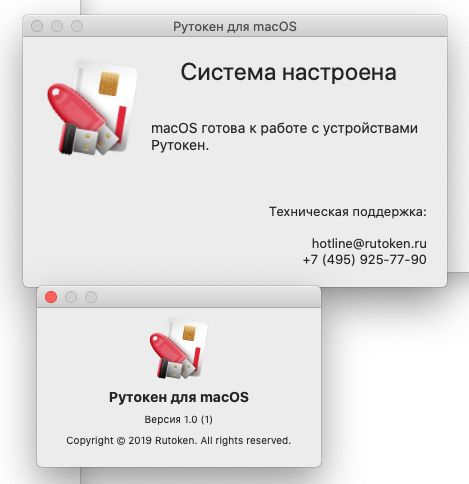
			<content type="html"><![CDATA[<p>Модуль поддержки Связки Ключей (KeyChain) установил, но ситуация не меняется</p>]]></content>
			<author>
				<name><![CDATA[Аваська]]></name>
				<uri>https://forum.rutoken.ru/user/11513/</uri>
			</author>
			<updated>2020-07-22T13:00:40Z</updated>
			<id>https://forum.rutoken.ru/post/14497/#p14497</id>
		</entry>
		<entry>
			<title type="html"><![CDATA[Re: MaCos - RDPWin]]></title>
			<link rel="alternate" href="https://forum.rutoken.ru/post/14496/#p14496" />
			<content type="html"><![CDATA[<p><span class="postimg"><a class="fancybox fancybox.image" rel="group" href="https://forum.rutoken.ru/uploads/images/2020/07/7946e4a6ae9699a5b83906e27da27845.png"><img class="fb_img" src="https://forum.rutoken.ru/uploads/previews/2020/07/7946e4a6ae9699a5b83906e27da27845.png" alt="" /></a></span> <span class="postimg"><a class="fancybox fancybox.image" rel="group" href="https://forum.rutoken.ru/uploads/images/2020/07/4e58b20f02a8e2dedb9a5c5ded14f13f.png"><img class="fb_img" src="https://forum.rutoken.ru/uploads/previews/2020/07/4e58b20f02a8e2dedb9a5c5ded14f13f.png" alt="" /></a></span> <br />Модуль поддержки Связки Ключей (KeyChain) это не установлено</p>]]></content>
			<author>
				<name><![CDATA[Аваська]]></name>
				<uri>https://forum.rutoken.ru/user/11513/</uri>
			</author>
			<updated>2020-07-22T12:52:00Z</updated>
			<id>https://forum.rutoken.ru/post/14496/#p14496</id>
		</entry>
		<entry>
			<title type="html"><![CDATA[Re: MaCos - RDPWin]]></title>
			<link rel="alternate" href="https://forum.rutoken.ru/post/14494/#p14494" />
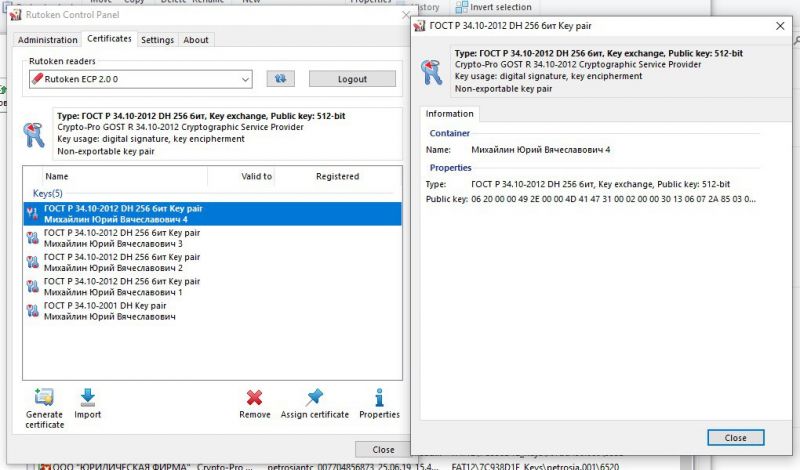
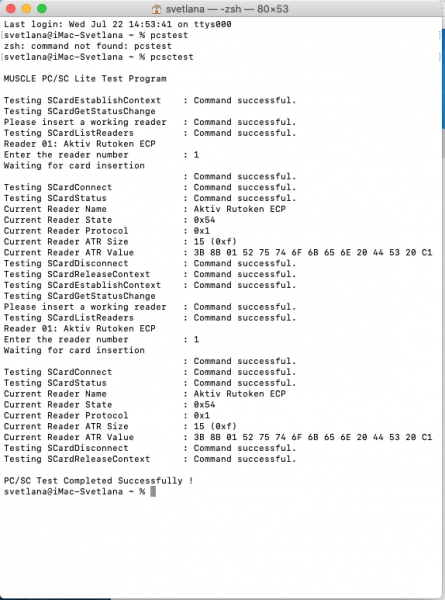
			<content type="html"><![CDATA[<p>Можете также во время этой ошибки в macOS в Терминале ввести команду:<br /><em>pcsctest</em><br />согласно <a href="https://www.rutoken.ru/download/manual/Rutoken_ECP_MacOS.pdf">инструкции</a> и прислать полученный вывод скриншотом.<br />Уточните еще у вас на macOS установлена <a href="https://www.rutoken.ru/support/download/mac/">актуальная версия драйвера рутокен</a>?</p>]]></content>
			<author>
				<name><![CDATA[Фатеева Светлана]]></name>
				<uri>https://forum.rutoken.ru/user/11129/</uri>
			</author>
			<updated>2020-07-22T11:26:45Z</updated>
			<id>https://forum.rutoken.ru/post/14494/#p14494</id>
		</entry>
		<entry>
			<title type="html"><![CDATA[Re: MaCos - RDPWin]]></title>
			<link rel="alternate" href="https://forum.rutoken.ru/post/14493/#p14493" />
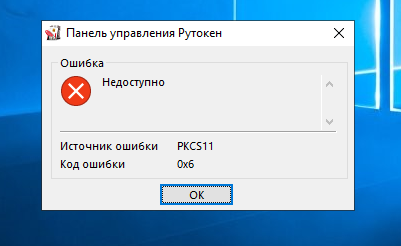
			<content type="html"><![CDATA[<p>Закрытие открытие сессии без извлечения ключа не помогает.<br />Нет прав на просмотр администратора. В диспетчере устройств отсутсвует раздел Контроллеры USB. <br /><span class="postimg"><a class="fancybox fancybox.image" rel="group" href="https://forum.rutoken.ru/uploads/images/2020/07/8522e2b9070aecff3f60b1a401d28831.jpg"><img class="fb_img" src="https://forum.rutoken.ru/uploads/previews/2020/07/8522e2b9070aecff3f60b1a401d28831.jpg" alt="" /></a></span> </p><p>Крипто Про версии 4.0.9944<br />В банке работаем через браузер. При возникновении ошибки портал Центр сертификации не обнаружил Рутокен. Панель управления Рутокен не запускается. <span class="postimg"><a class="fancybox fancybox.image" rel="group" href="https://forum.rutoken.ru/uploads/images/2020/07/08658a6921eb4846d3ae038612f82d4d.png"><img class="fb_img" src="https://forum.rutoken.ru/uploads/previews/2020/07/08658a6921eb4846d3ae038612f82d4d.png" alt="" /></a></span> <br /> Но при этом огонек на Рутокене светится</p><br /><p>п.с. Если использовать подключение Win to Win, то такой истории не наблюдается. Пробовал на этом же Маке, Win установлена с помощью bootcamp</p>]]></content>
			<author>
				<name><![CDATA[Аваська]]></name>
				<uri>https://forum.rutoken.ru/user/11513/</uri>
			</author>
			<updated>2020-07-22T10:33:25Z</updated>
			<id>https://forum.rutoken.ru/post/14493/#p14493</id>
		</entry>
		<entry>
			<title type="html"><![CDATA[Re: MaCos - RDPWin]]></title>
			<link rel="alternate" href="https://forum.rutoken.ru/post/14487/#p14487" />
			<content type="html"><![CDATA[<p>Здравствуйте,<br />Уточните пожалуйста помогает ли закрытие RDP-сессии и повторное ее открытие без переподключения рутокена к компьютеру?<br />Во время ошибки Рутокен виден в Панели управления Рутокен в OS Windows 10?<br />Пришлите пожалуйста скриншот &quot;Панели управления Рутокен&quot; на вкладке Сертификаты в OS Windows 10.<br />Какая версия Криптопро CSP установлена в OS Windows 10?<br />Работаете в банке через специальное приложение или в браузере? Если в браузере, тогда попробуйте во время этой ошибки зайти на наш портал <a href="https://ra.rutoken.ru/devices/list">Центр сертификации</a> и проверить работу носителя. Возникает ли ошибка на портале?<br />Также попробуйте воспользоваться решением из <a href="https://dev.rutoken.ru/display/KB/CP1017">статьи</a>.</p>]]></content>
			<author>
				<name><![CDATA[Фатеева Светлана]]></name>
				<uri>https://forum.rutoken.ru/user/11129/</uri>
			</author>
			<updated>2020-07-22T09:33:38Z</updated>
			<id>https://forum.rutoken.ru/post/14487/#p14487</id>
		</entry>
		<entry>
			<title type="html"><![CDATA[MaCos - RDPWin]]></title>
			<link rel="alternate" href="https://forum.rutoken.ru/post/14484/#p14484" />
			<content type="html"><![CDATA[<p>Добрый день!</p><p>Рутокен 2.0<br />Используем Мак для подключения к удаленной вин10. Версия РДП 10.3.12 (1801)</p><p>Особенность, которая жутко бесит, заключается в:<br />заходим в Банк, при простое через определенное время банк закрывает сессию. При следующей попытке входа получаем окно Крипто Про с предложением выбрать устройство с ключом. При выборе рутокена в поле Состояние &quot;Некорректный тип носителя или носитель не отформатирован&quot;<br />Лечится только следующим способом - Закрытие РДП-сессии, вытаскивание рутокена из мака, вставка рутокена в мак, подключение к винде.<br />Драйвера поставлены на мак и на удаленную машину<br />Как это победить?</p>]]></content>
			<author>
				<name><![CDATA[Аваська]]></name>
				<uri>https://forum.rutoken.ru/user/11513/</uri>
			</author>
			<updated>2020-07-22T09:02:08Z</updated>
			<id>https://forum.rutoken.ru/post/14484/#p14484</id>
		</entry>
</feed>