<?xml version="1.0" encoding="utf-8"?>
<feed xmlns="http://www.w3.org/2005/Atom">
	<title type="html"><![CDATA[Форум Рутокен &mdash; Ошибка записи в файл rtAPI.dll при установке]]></title>
	<link rel="self" href="https://forum.rutoken.ru/feed/atom/topic/3443/" />
	<updated>2021-11-12T09:00:25Z</updated>
	<generator>PunBB</generator>
	<id>https://forum.rutoken.ru/topic/3443/</id>
		<entry>
			<title type="html"><![CDATA[Re: Ошибка записи в файл rtAPI.dll при установке]]></title>
			<link rel="alternate" href="https://forum.rutoken.ru/post/16245/#p16245" />
			<content type="html"><![CDATA[<p>Здравствуйте, <strong>elena_</strong>, <br />Рекомендуем установить разрешение Полный доступ для Системы к каталогу C:\Windows\system32\ и после этого проверить установку Драйверов Рутокен еще раз.</p>]]></content>
			<author>
				<name><![CDATA[Фатеева Светлана]]></name>
				<uri>https://forum.rutoken.ru/user/11129/</uri>
			</author>
			<updated>2021-11-12T09:00:25Z</updated>
			<id>https://forum.rutoken.ru/post/16245/#p16245</id>
		</entry>
		<entry>
			<title type="html"><![CDATA[Ошибка записи в файл rtAPI.dll при установке]]></title>
			<link rel="alternate" href="https://forum.rutoken.ru/post/16234/#p16234" />
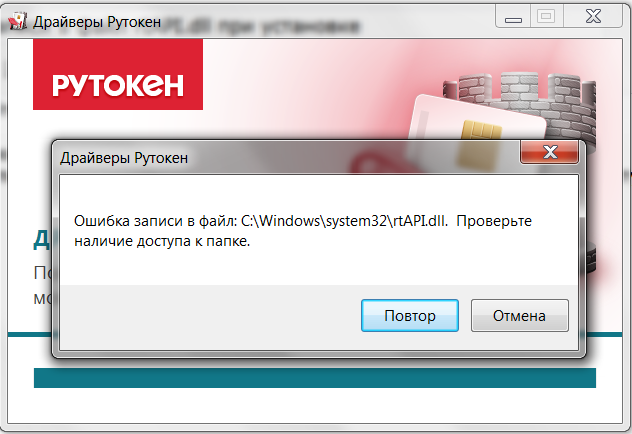
			<content type="html"><![CDATA[<p>Здравствуйте.</p><p>При попытке установить rtDrivers.exe выходит ошибка:<br />Ошибка записи в файл C:\Windows\system32\rtAPI.dll. Проверьте наличие доступа к папке.</p><p><span class="postimg"><a class="fancybox fancybox.image" rel="group" href="https://forum.rutoken.ru/uploads/images/2021/11/9ccfab63b4d926e3a1f1096e94225a44.png"><img class="fb_img" src="https://forum.rutoken.ru/uploads/previews/2021/11/9ccfab63b4d926e3a1f1096e94225a44.png" alt="" /></a></span></p><p>В конце лога такой текст:<br /></p><div class="codebox"><pre><code>MSI (s) (08:EC) [18:04:36:406]: Executing op: FileCopy(SourceName=rtAPI.dll,SourceCabKey=rtAPI.dll,DestName=rtAPI.dll,Attributes=1536,FileSize=134176,PerTick=65536,,VerifyMedia=1,,,,,CheckCRC=0,Version=1.11.4.0,Language=1049,InstallMode=61865984,,,,,,,)
MSI (s) (08:EC) [18:04:36:407]: File: C:\Windows\SysWOW64\rtAPI.dll;    To be installed;    Won&#039;t patch;    No existing file
MSI (s) (08:EC) [18:04:36:407]: Source for file &#039;rtAPI.dll&#039; is compressed
MSI (s) (08:EC) [18:04:36:410]: Executing op: SetTargetFolder(Folder=C:\Windows\system32\)
MSI (s) (08:EC) [18:04:36:411]: Executing op: SetSourceFolder(Folder=1\SYSTEM~1\|System64Folder\)
MSI (s) (08:EC) [18:04:36:411]: Executing op: FileCopy(SourceName=rtAPI.dll,SourceCabKey=rtAPI.dll.Win64,DestName=rtAPI.dll,Attributes=1536,FileSize=157728,PerTick=65536,,VerifyMedia=1,,,,,CheckCRC=0,Version=1.11.4.0,Language=1049,InstallMode=61865984,,,,,,,)
MSI (s) (08:EC) [18:04:36:411]: File: C:\Windows\system32\rtAPI.dll;    To be installed;    Won&#039;t patch;    No existing file
MSI (s) (08:EC) [18:04:36:411]: Source for file &#039;rtAPI.dll.Win64&#039; is compressed
MSI (s) (08:EC) [18:04:36:413]: Note: 1: 1310 2: 0 3: C:\Windows\system32\rtAPI.dll 
MSI (s) (08:EC) [18:04:36:413]: Transforming table Error.</code></pre></div><p>У пользователя есть административные права, другие программы и драйверы устанавливаются без проблем.<br />Пробовал так же запустить установку через контекстное меню и &quot;Запустить от имени администратора&quot;.<br />Антивирусов не установлено.<br />ОС: Windows 7 64-bit</p><p>У каталога C:\Windows\system32\ для пользователя &quot;TrustedInstaller&quot; есть полные права. У остальных пользователей прав на запись в каталог нет. Я так понимаю это нормально?<br /><span class="postimg"><a class="fancybox fancybox.image" rel="group" href="https://forum.rutoken.ru/uploads/images/2021/11/bb661d91ef45fc9646ffa5f69f5f1059.png"><img class="fb_img" src="https://forum.rutoken.ru/uploads/previews/2021/11/bb661d91ef45fc9646ffa5f69f5f1059.png" alt="" /></a></span></p>]]></content>
			<author>
				<name><![CDATA[elena_]]></name>
				<uri>https://forum.rutoken.ru/user/11918/</uri>
			</author>
			<updated>2021-11-11T13:50:12Z</updated>
			<id>https://forum.rutoken.ru/post/16234/#p16234</id>
		</entry>
</feed>