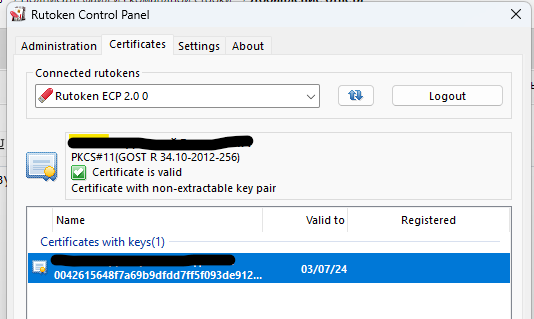
У меня есть ИП-шный токен.
Хочется сделать скрипт для подписания файлов, которые бы верифицировались на госуслугах. Чтобы не пользоватся КриптоПро. Я до конца так и не понял возможно ли это в принципе.
Я попытался настроить Openssl как написано в мануалах, но у меня ничего не вышло. Такое впечатление, что не находит engine.
#
# OpenSSL example configuration file.
# See doc/man5/config.pod for more info.
#
# This is mostly being used for generation of certificate requests,
# but may be used for auto loading of providers

# Note that you can include other files from the main configuration
# file using the .include directive.
#.include filename

# This definition stops the following lines choking if HOME isn't
# defined.
HOME            = .

# Use this in order to automatically load providers.
openssl_conf = openssl_init


# Comment out the next line to ignore configuration errors
config_diagnostics = 1

# Extra OBJECT IDENTIFIER info:
# oid_file       = $ENV::HOME/.oid
oid_section = new_oids

# To use this configuration file with the "-extfile" option of the
# "openssl x509" utility, name here the section containing the
# X.509v3 extensions to use:
# extensions        =
# (Alternatively, use a configuration file that has only
# X.509v3 extensions in its main [= default] section.)

[ new_oids ]
# We can add new OIDs in here for use by 'ca', 'req' and 'ts'.
# Add a simple OID like this:
# testoid1=1.2.3.4
# Or use config file substitution like this:
# testoid2=${testoid1}.5.6

# Policies used by the TSA examples.
tsa_policy1 = 1.2.3.4.1
tsa_policy2 = 1.2.3.4.5.6
tsa_policy3 = 1.2.3.4.5.7

# For FIPS
# Optionally include a file that is generated by the OpenSSL fipsinstall
# application. This file contains configuration data required by the OpenSSL
# fips provider. It contains a named section e.g. [fips_sect] which is
# referenced from the [provider_sect] below.
# Refer to the OpenSSL security policy for more information.
# .include fipsmodule.cnf

[openssl_init]
engines = engine_section
providers = provider_sect

[engine_section]
pkcs11 = pkcs11_section

[pkcs11_section]
engine_id = pkcs11
dynamic_path = C:\\Users\\Golovastik\\bin\\rtengine.dll
MODULE_PATH = C:\\Users\\Golovastik\\bin\\rtpkcs11ecp.dll
default_algorithms = ALL


# List of providers to load
[provider_sect]
default = default_sect
# The fips section name should match the section name inside the
# included fipsmodule.cnf.
# fips = fips_sect

# If no providers are activated explicitly, the default one is activated implicitly.
# See man 7 OSSL_PROVIDER-default for more details.
#
# If you add a section explicitly activating any other provider(s), you most
# probably need to explicitly activate the default provider, otherwise it
# becomes unavailable in openssl.  As a consequence applications depending on
# OpenSSL may not work correctly which could lead to significant system
# problems including inability to remotely access the system.
[default_sect]
# activate = 1


####################################################################
[ ca ]
default_ca    = CA_default        # The default ca section

####################################################################
[ CA_default ]

dir        = ./demoCA        # Where everything is kept
certs        = $dir/certs        # Where the issued certs are kept
crl_dir        = $dir/crl        # Where the issued crl are kept
database    = $dir/index.txt    # database index file.
#unique_subject    = no            # Set to 'no' to allow creation of
                    # several certs with same subject.
new_certs_dir    = $dir/newcerts        # default place for new certs.

certificate    = $dir/cacert.pem     # The CA certificate
serial        = $dir/serial         # The current serial number
crlnumber    = $dir/crlnumber    # the current crl number
                    # must be commented out to leave a V1 CRL
crl        = $dir/crl.pem         # The current CRL
private_key    = $dir/private/cakey.pem # The private key

x509_extensions    = usr_cert        # The extensions to add to the cert

# Comment out the following two lines for the "traditional"
# (and highly broken) format.
name_opt     = ca_default        # Subject Name options
cert_opt     = ca_default        # Certificate field options

# Extension copying option: use with caution.
# copy_extensions = copy

# Extensions to add to a CRL. Note: Netscape communicator chokes on V2 CRLs
# so this is commented out by default to leave a V1 CRL.
# crlnumber must also be commented out to leave a V1 CRL.
# crl_extensions    = crl_ext

default_days    = 365            # how long to certify for
default_crl_days= 30            # how long before next CRL
default_md    = default        # use public key default MD
preserve    = no            # keep passed DN ordering

# A few difference way of specifying how similar the request should look
# For type CA, the listed attributes must be the same, and the optional
# and supplied fields are just that :-)
policy        = policy_match

# For the CA policy
[ policy_match ]
countryName        = match
stateOrProvinceName    = match
organizationName    = match
organizationalUnitName    = optional
commonName        = supplied
emailAddress        = optional

# For the 'anything' policy
# At this point in time, you must list all acceptable 'object'
# types.
[ policy_anything ]
countryName        = optional
stateOrProvinceName    = optional
localityName        = optional
organizationName    = optional
organizationalUnitName    = optional
commonName        = supplied
emailAddress        = optional

####################################################################
[ req ]
default_bits        = 2048
default_keyfile     = privkey.pem
distinguished_name    = req_distinguished_name
attributes        = req_attributes
x509_extensions    = v3_ca    # The extensions to add to the self signed cert

# Passwords for private keys if not present they will be prompted for
# input_password = secret
# output_password = secret

# This sets a mask for permitted string types. There are several options.
# default: PrintableString, T61String, BMPString.
# pkix     : PrintableString, BMPString (PKIX recommendation before 2004)
# utf8only: only UTF8Strings (PKIX recommendation after 2004).
# nombstr : PrintableString, T61String (no BMPStrings or UTF8Strings).
# MASK:XXXX a literal mask value.
# WARNING: ancient versions of Netscape crash on BMPStrings or UTF8Strings.
string_mask = utf8only

# req_extensions = v3_req # The extensions to add to a certificate request

[ req_distinguished_name ]
countryName            = Country Name (2 letter code)
countryName_default        = AU
countryName_min            = 2
countryName_max            = 2

stateOrProvinceName        = State or Province Name (full name)
stateOrProvinceName_default    = Some-State

localityName            = Locality Name (eg, city)

0.organizationName        = Organization Name (eg, company)
0.organizationName_default    = Internet Widgits Pty Ltd

# we can do this but it is not needed normally :-)
#1.organizationName        = Second Organization Name (eg, company)
#1.organizationName_default    = World Wide Web Pty Ltd

organizationalUnitName        = Organizational Unit Name (eg, section)
#organizationalUnitName_default    =

commonName            = Common Name (e.g. server FQDN or YOUR name)
commonName_max            = 64

emailAddress            = Email Address
emailAddress_max        = 64

# SET-ex3            = SET extension number 3

[ req_attributes ]
challengePassword        = A challenge password
challengePassword_min        = 4
challengePassword_max        = 20

unstructuredName        = An optional company name

[ usr_cert ]

# These extensions are added when 'ca' signs a request.

# This goes against PKIX guidelines but some CAs do it and some software
# requires this to avoid interpreting an end user certificate as a CA.

basicConstraints=CA:FALSE

# This is typical in keyUsage for a client certificate.
# keyUsage = nonRepudiation, digitalSignature, keyEncipherment

# PKIX recommendations harmless if included in all certificates.
subjectKeyIdentifier=hash
authorityKeyIdentifier=keyid,issuer

# This stuff is for subjectAltName and issuerAltname.
# Import the email address.
# subjectAltName=email:copy
# An alternative to produce certificates that aren't
# deprecated according to PKIX.
# subjectAltName=email:move

# Copy subject details
# issuerAltName=issuer:copy

# This is required for TSA certificates.
# extendedKeyUsage = critical,timeStamping

[ v3_req ]

# Extensions to add to a certificate request

basicConstraints = CA:FALSE
keyUsage = nonRepudiation, digitalSignature, keyEncipherment

[ v3_ca ]


# Extensions for a typical CA


# PKIX recommendation.

subjectKeyIdentifier=hash

authorityKeyIdentifier=keyid:always,issuer

basicConstraints = critical,CA:true

# Key usage: this is typical for a CA certificate. However since it will
# prevent it being used as an test self-signed certificate it is best
# left out by default.
# keyUsage = cRLSign, keyCertSign

# Include email address in subject alt name: another PKIX recommendation
# subjectAltName=email:copy
# Copy issuer details
# issuerAltName=issuer:copy

# DER hex encoding of an extension: beware experts only!
# obj=DER:02:03
# Where 'obj' is a standard or added object
# You can even override a supported extension:
# basicConstraints= critical, DER:30:03:01:01:FF

[ crl_ext ]

# CRL extensions.
# Only issuerAltName and authorityKeyIdentifier make any sense in a CRL.

# issuerAltName=issuer:copy
authorityKeyIdentifier=keyid:always

[ proxy_cert_ext ]
# These extensions should be added when creating a proxy certificate

# This goes against PKIX guidelines but some CAs do it and some software
# requires this to avoid interpreting an end user certificate as a CA.

basicConstraints=CA:FALSE

# This is typical in keyUsage for a client certificate.
# keyUsage = nonRepudiation, digitalSignature, keyEncipherment

# PKIX recommendations harmless if included in all certificates.
subjectKeyIdentifier=hash
authorityKeyIdentifier=keyid,issuer

# This stuff is for subjectAltName and issuerAltname.
# Import the email address.
# subjectAltName=email:copy
# An alternative to produce certificates that aren't
# deprecated according to PKIX.
# subjectAltName=email:move

# Copy subject details
# issuerAltName=issuer:copy

# This really needs to be in place for it to be a proxy certificate.
proxyCertInfo=critical,language:id-ppl-anyLanguage,pathlen:3,policy:foo

####################################################################
[ tsa ]

default_tsa = tsa_config1    # the default TSA section

[ tsa_config1 ]

# These are used by the TSA reply generation only.
dir        = ./demoCA        # TSA root directory
serial        = $dir/tsaserial    # The current serial number (mandatory)
crypto_device    = builtin        # OpenSSL engine to use for signing
signer_cert    = $dir/tsacert.pem     # The TSA signing certificate
                    # (optional)
certs        = $dir/cacert.pem    # Certificate chain to include in reply
                    # (optional)
signer_key    = $dir/private/tsakey.pem # The TSA private key (optional)
signer_digest  = sha256            # Signing digest to use. (Optional)
default_policy    = tsa_policy1        # Policy if request did not specify it
                    # (optional)
other_policies    = tsa_policy2, tsa_policy3    # acceptable policies (optional)
digests     = sha1, sha256, sha384, sha512  # Acceptable message digests (mandatory)
accuracy    = secs:1, millisecs:500, microsecs:100    # (optional)
clock_precision_digits  = 0    # number of digits after dot. (optional)
ordering        = yes    # Is ordering defined for timestamps?
                # (optional, default: no)
tsa_name        = yes    # Must the TSA name be included in the reply?
                # (optional, default: no)
ess_cert_id_chain    = no    # Must the ESS cert id chain be included?
                # (optional, default: no)
ess_cert_id_alg        = sha1    # algorithm to compute certificate
                # identifier (optional, default: sha1)

[insta] # CMP using Insta Demo CA
# Message transfer
server = pki.certificate.fi:8700
# proxy = # set this as far as needed, e.g., http://192.168.1.1:8080
# tls_use = 0
path = pkix/

# Server authentication
recipient = "/C=FI/O=Insta Demo/CN=Insta Demo CA" # or set srvcert or issuer
ignore_keyusage = 1 # potentially needed quirk
unprotected_errors = 1 # potentially needed quirk
extracertsout = insta.extracerts.pem

# Client authentication
ref = 3078 # user identification
secret = pass:insta # can be used for both client and server side

# Generic message options
cmd = ir # default operation, can be overridden on cmd line with, e.g., kur

# Certificate enrollment
subject = "/CN=openssl-cmp-test"
newkey = insta.priv.pem
out_trusted = apps/insta.ca.crt # does not include keyUsage digitalSignature
certout = insta.cert.pem

[pbm] # Password-based protection for Insta CA
# Server and client authentication
ref = $insta::ref # 3078
secret = $insta::secret # pass:insta

[signature] # Signature-based protection for Insta CA
# Server authentication
trusted = $insta::out_trusted # apps/insta.ca.crt

# Client authentication
secret = # disable PBM
key = $insta::newkey # insta.priv.pem
cert = $insta::certout # insta.cert.pem

[ir]
cmd = ir

[cr]
cmd = cr

[kur]
# Certificate update
cmd = kur
oldcert = $insta::certout # insta.cert.pem

[rr]
# Certificate revocation
cmd = rr
oldcert = $insta::certout # insta.cert.pem
 C:\Users\Golovastik\bin>openssl dgst -keyform engine -sign "pkcs11:manufacturer=Aktiv%20Co.;model=Rutoken%20ECP;serial=4108752d" -engine rtengine -out signature "data_to_sign"
FATAL: Startup failure (dev note: apps_startup()) for openssl
A01E0000:error:13000089:engine routines:int_ctrl_helper:invalid cmd name:crypto\engine\eng_ctrl.c:90:
A01E0000:error:13000089:engine routines:ENGINE_ctrl_cmd_string:invalid cmd name:crypto\engine\eng_ctrl.c:258:
A01E0000:error:13000066:engine routines:int_engine_configure:engine configuration error:crypto\engine\eng_cnf.c:139:section=pkcs11_section, name=MODULE_PATH, value=C:\Users\Golovastik\bin\rtpkcs11ecp.dll
A01E0000:error:0700006D:configuration file routines:module_run:module initialization error:crypto\conf\conf_mod.c:276:module=engines, value=engine_section retcode=-1