<?xml version="1.0" encoding="utf-8"?>
<feed xmlns="http://www.w3.org/2005/Atom">
	<title type="html"><![CDATA[Форум Рутокен &mdash; Перестал видеть сертификат в Контейнерах]]></title>
	<link rel="self" href="https://forum.rutoken.ru/feed/atom/topic/4493/" />
	<updated>2024-11-25T07:36:47Z</updated>
	<generator>PunBB</generator>
	<id>https://forum.rutoken.ru/topic/4493/</id>
		<entry>
			<title type="html"><![CDATA[Re: Перестал видеть сертификат в Контейнерах]]></title>
			<link rel="alternate" href="https://forum.rutoken.ru/post/26553/#p26553" />
			<content type="html"><![CDATA[<p><strong>p.elagin</strong>, выбрать удобный магазин вы можете на нашем <a href="https://www.rutoken.ru/purchase/where-to-buy/">сайте</a>.</p>]]></content>
			<author>
				<name><![CDATA[Филиппов Никита]]></name>
				<uri>https://forum.rutoken.ru/user/15532/</uri>
			</author>
			<updated>2024-11-25T07:36:47Z</updated>
			<id>https://forum.rutoken.ru/post/26553/#p26553</id>
		</entry>
		<entry>
			<title type="html"><![CDATA[Re: Перестал видеть сертификат в Контейнерах]]></title>
			<link rel="alternate" href="https://forum.rutoken.ru/post/26550/#p26550" />
			<content type="html"><![CDATA[<div class="quotebox"><cite>Филиппов Никита пишет:</cite><blockquote><p><strong>p.elagin</strong>, Могу ли я подключиться к вашему ПК удаленно?<br />Если это возможно запустите программу RuDesktop и сообщите данные для подключения ID и пароль ответным письмом на hotline@rutoken.ru или по телефону +7 (495) 925-77-90.</p></blockquote></div><br /><p>В среду едим получать новый токен, с этим ничего не вышло, виндовс его таже не открыл( я сам не видел дал другу и он попробовал подключится к диадоку)</p><br /><p>Скажите где мне купить токен, только не тот который был - лайт или как его там , а нормальный, как остальные два у меня ? </p><p>я покупал напротив налоговой, может есть ближайшее место, поедет мой представитель,&nbsp; он не очень понимает в компах и токенах</p>]]></content>
			<author>
				<name><![CDATA[p.elagin]]></name>
				<uri>https://forum.rutoken.ru/user/16011/</uri>
			</author>
			<updated>2024-11-23T11:23:52Z</updated>
			<id>https://forum.rutoken.ru/post/26550/#p26550</id>
		</entry>
		<entry>
			<title type="html"><![CDATA[Re: Перестал видеть сертификат в Контейнерах]]></title>
			<link rel="alternate" href="https://forum.rutoken.ru/post/26480/#p26480" />
			<content type="html"><![CDATA[<p><strong>p.elagin</strong>, Могу ли я подключиться к вашему ПК удаленно?<br />Если это возможно запустите программу RuDesktop и сообщите данные для подключения ID и пароль ответным письмом на hotline@rutoken.ru или по телефону +7 (495) 925-77-90.</p>]]></content>
			<author>
				<name><![CDATA[Филиппов Никита]]></name>
				<uri>https://forum.rutoken.ru/user/15532/</uri>
			</author>
			<updated>2024-11-02T12:26:58Z</updated>
			<id>https://forum.rutoken.ru/post/26480/#p26480</id>
		</entry>
		<entry>
			<title type="html"><![CDATA[Re: Перестал видеть сертификат в Контейнерах]]></title>
			<link rel="alternate" href="https://forum.rutoken.ru/post/26479/#p26479" />
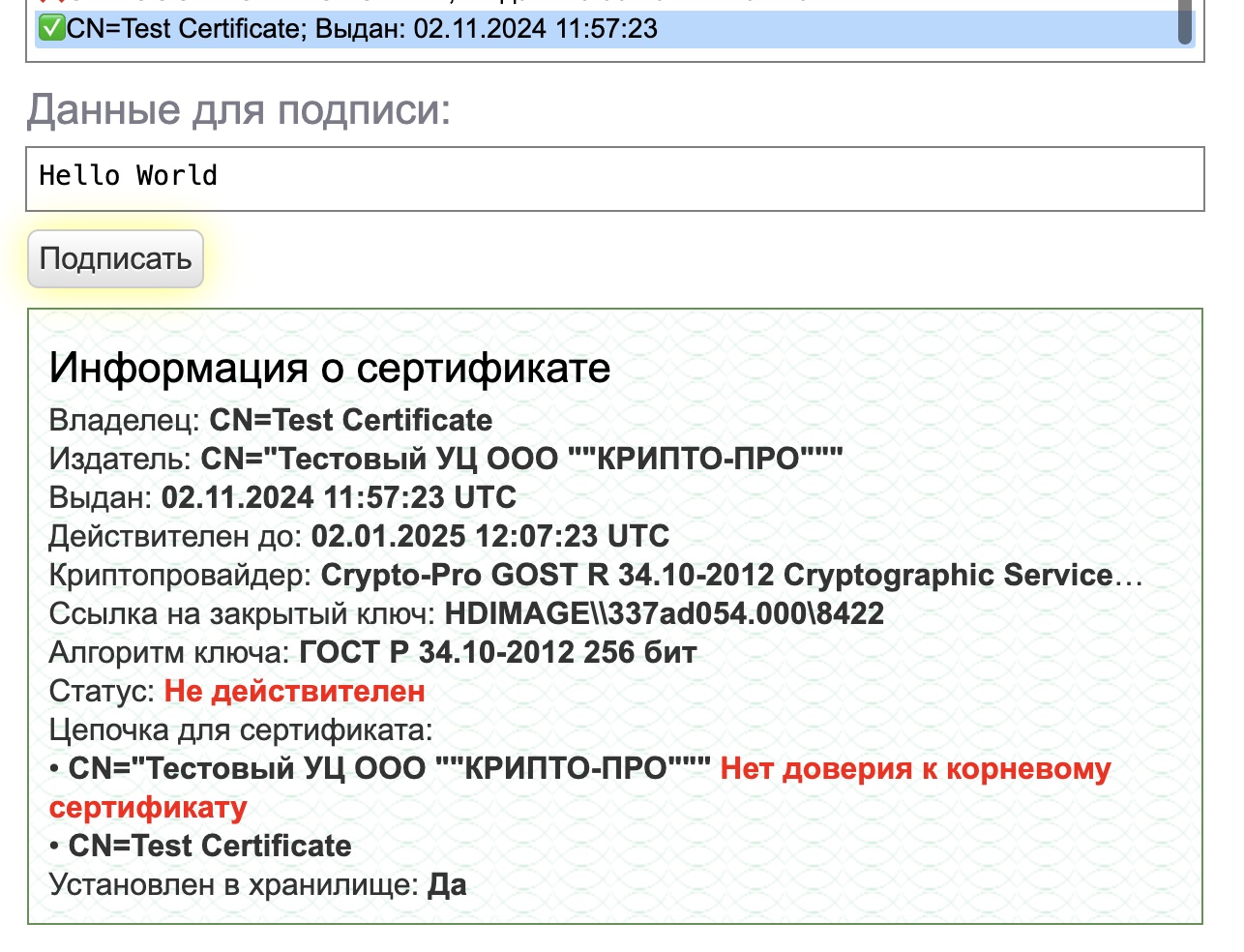
			<content type="html"><![CDATA[<p>Информация о сертификате<br />Владелец: CN=Test Certificate</p><p>Издатель: CN=&quot;Тестовый УЦ ООО &quot;&quot;КРИПТО-ПРО&quot;&quot;&quot;</p><p>Выдан: 02.11.2024 11:57:23 UTC</p><p>Действителен до: 02.01.2025 12:07:23 UTC</p><p>Криптопровайдер: Crypto-Pro GOST R 34.10-2012 Cryptographic Service Provider</p><p>Ссылка на закрытый ключ: HDIMAGE\\337ad054.000\8422</p><p>Алгоритм ключа: ГОСТ Р 34.10-2012 256 бит</p><p>Статус: Действителен</p><p>Установлен в хранилище: Да</p>]]></content>
			<author>
				<name><![CDATA[p.elagin]]></name>
				<uri>https://forum.rutoken.ru/user/16011/</uri>
			</author>
			<updated>2024-11-02T12:17:04Z</updated>
			<id>https://forum.rutoken.ru/post/26479/#p26479</id>
		</entry>
		<entry>
			<title type="html"><![CDATA[Re: Перестал видеть сертификат в Контейнерах]]></title>
			<link rel="alternate" href="https://forum.rutoken.ru/post/26478/#p26478" />
			<content type="html"><![CDATA[<div class="quotebox"><cite>Филиппов Никита пишет:</cite><blockquote><p><strong>p.elagin</strong>, Уточните пожалуйста, где у вас возникла данная ошибка?</p><p>Ошибка у меня возникает, когда я вставляю токен и хочу зайти например в диадок или куда-то еще, куда я входил ранее, если смотреть на приложение Инструменты Крипто про, то у меня при одном только этом токене в разделе Контейнеры пусто. </p><p>Я выше писал, само устройство как я понимаю работает - в консоле я протыкал все - там пишет Success, я думаю при записи или типа того был поврежден сам контейнер </p><br /><p>Проверка на другом ПК позволит нам локализовать проблему, лиюо все же с токеном либо с контейнером электронной подписи.</p><p>Винда его прочитает, ну допустим, какие мы сделаем выводы, допустим прочитала, что мы делаем далее? </p><p>Можно дополнительно сделать следующее, на <a href="https://cryptopro.ru/sites/default/files/products/cades/demopage/cades_bes_sample.html">сайте</a> плагина КриптоПро ЭЦП вы можете получить личный тестовый сертификат, если он установится и будет отображаться, то проблема явно с контейнером.</p></blockquote></div><br /><p><span class="postimg"><a class="fancybox fancybox.image" rel="group" href="https://forum.rutoken.ru/uploads/images/2024/11/686a126acb66e0aa3d32ca303a28001a.jpg"><img class="fb_img" src="https://forum.rutoken.ru/uploads/previews/2024/11/686a126acb66e0aa3d32ca303a28001a.jpg" alt="" /></a></span> </p><p>я установил все и проверил, вот что пишет, но при выборе сертификата - он опять делает окно которое я показал</p><p>и пишет &quot;Insert carrier rutoken_lt_428ca6e2 to open container SCARD\rutoken_lt_428ca6e2\0B00\C8B4&quot; </p><p>Ставлю тестовый сертификат </p><p><span class="postimg"><a class="fancybox fancybox.image" rel="group" href="https://forum.rutoken.ru/uploads/images/2024/11/3ff579a5d20ab182715e11272b0f1ed1.jpg"><img class="fb_img" src="https://forum.rutoken.ru/uploads/previews/2024/11/3ff579a5d20ab182715e11272b0f1ed1.jpg" alt="" /></a></span></p><p><span class="postimg"><a class="fancybox fancybox.image" rel="group" href="https://forum.rutoken.ru/uploads/images/2024/11/ddb35165ed97d7c1416c0f08ef2814a0.jpg"><img class="fb_img" src="https://forum.rutoken.ru/uploads/previews/2024/11/ddb35165ed97d7c1416c0f08ef2814a0.jpg" alt="" /></a></span></p>]]></content>
			<author>
				<name><![CDATA[p.elagin]]></name>
				<uri>https://forum.rutoken.ru/user/16011/</uri>
			</author>
			<updated>2024-11-02T12:11:54Z</updated>
			<id>https://forum.rutoken.ru/post/26478/#p26478</id>
		</entry>
		<entry>
			<title type="html"><![CDATA[Re: Перестал видеть сертификат в Контейнерах]]></title>
			<link rel="alternate" href="https://forum.rutoken.ru/post/26430/#p26430" />
			<content type="html"><![CDATA[<p><strong>p.elagin</strong>, Уточните пожалуйста, где у вас возникла данная ошибка?<br />Проверка на другом ПК позволит нам локализовать проблему, лиюо все же с токеном либо с контейнером электронной подписи.<br />Можно дополнительно сделать следующее, на <a href="https://cryptopro.ru/sites/default/files/products/cades/demopage/cades_bes_sample.html">сайте</a> плагина КриптоПро ЭЦП вы можете получить личный тестовый сертификат, если он установится и будет отображаться, то проблема явно с контейнером.</p>]]></content>
			<author>
				<name><![CDATA[Филиппов Никита]]></name>
				<uri>https://forum.rutoken.ru/user/15532/</uri>
			</author>
			<updated>2024-10-24T13:00:44Z</updated>
			<id>https://forum.rutoken.ru/post/26430/#p26430</id>
		</entry>
		<entry>
			<title type="html"><![CDATA[Re: Перестал видеть сертификат в Контейнерах]]></title>
			<link rel="alternate" href="https://forum.rutoken.ru/post/26429/#p26429" />
			<content type="html"><![CDATA[<div class="quotebox"><cite>Филиппов Никита пишет:</cite><blockquote><p><strong>p.elagin</strong>, остается только проверить на другом ПК.</p></blockquote></div><p>CORRUPTED LABEL</p><p>что это за ошибка? </p><p>что мне даст проверка на другом компе то?</p>]]></content>
			<author>
				<name><![CDATA[p.elagin]]></name>
				<uri>https://forum.rutoken.ru/user/16011/</uri>
			</author>
			<updated>2024-10-24T10:08:22Z</updated>
			<id>https://forum.rutoken.ru/post/26429/#p26429</id>
		</entry>
		<entry>
			<title type="html"><![CDATA[Re: Перестал видеть сертификат в Контейнерах]]></title>
			<link rel="alternate" href="https://forum.rutoken.ru/post/26415/#p26415" />
			<content type="html"><![CDATA[<p><strong>p.elagin</strong>, остается только проверить на другом ПК.</p>]]></content>
			<author>
				<name><![CDATA[Филиппов Никита]]></name>
				<uri>https://forum.rutoken.ru/user/15532/</uri>
			</author>
			<updated>2024-10-24T08:14:44Z</updated>
			<id>https://forum.rutoken.ru/post/26415/#p26415</id>
		</entry>
		<entry>
			<title type="html"><![CDATA[Re: Перестал видеть сертификат в Контейнерах]]></title>
			<link rel="alternate" href="https://forum.rutoken.ru/post/26414/#p26414" />
			<content type="html"><![CDATA[<div class="quotebox"><cite>Филиппов Никита пишет:</cite><blockquote><p><strong>p.elagin</strong>, Настройки Mac, в данной <a href="https://dev.rutoken.ru/pages/viewpage.action?pageId=72451200">статье</a> пример, интерфейс мог устареть, но суть такая же.<br />Токен рабочий, осталось только настроить КриптоПро CSP.</p></blockquote></div><br /><br /><p>поставил как написано, отключив все безопасность, итог тот же - контейнер пуст ( (((( </p><p>ru.cryptopro.csp-cades-5.0.13000 - вот это установил </p><p>токен также мигает и все не горит постоянно</p><br /><p>Product version: 1.2.0<br />Commit ID: ed8f2aef<br />[2024-10-23T22:21:55+02:00] TRACE: &lt;TokenDriver.swift:15:init()&gt; INPUT<br />[2024-10-23T22:21:55+02:00] TRACE: &lt;Pkcs11TokenManager.swift:29:init()&gt; Token with serial 428CA6E2 is connected on startup<br />[2024-10-23T22:21:55+02:00] TRACE: &lt;Pkcs11TokenManager.swift:33:init()&gt; Start watching thread to monitor token events<br />[2024-10-23T22:21:55+02:00] TRACE: &lt;TokenDriver.swift:17:init()&gt; OUT<br />[2024-10-23T22:21:55+02:00] TRACE: &lt;TokenDriver.swift:30:tokenDriver(_:createTokenFor:aid:)&gt; INPUT &lt;RutokenCTK.TokenDriver: 0x7fac8f405860&gt; &lt;TKSmartCard: 0x7fac8f206330&gt; nil<br />[2024-10-23T22:21:55+02:00] TRACE: &lt;Token.swift:37:init(pkcs11Token:smartCard:aid:tokenDriver:)&gt; INPUT<br />[2024-10-23T22:21:55+02:00] ERROR: &lt;Pkcs11ObjectManager.swift:70:findObjects(ofType:)&gt; C_FindObjects failed with 0x6<br />0&nbsp; &nbsp;RutokenCTK&nbsp; &nbsp; &nbsp; &nbsp; &nbsp; &nbsp; &nbsp; &nbsp; &nbsp; &nbsp; &nbsp; &nbsp; &nbsp; 0x0000000102c23ab8 $s10RutokenCTK19Pkcs11ObjectManagerC11findObjects33_051F20DE6A47BFA1F05D7A14DFA08558LL6ofTypeSaySuGs5Int32V_tF + 760<br />1&nbsp; &nbsp;RutokenCTK&nbsp; &nbsp; &nbsp; &nbsp; &nbsp; &nbsp; &nbsp; &nbsp; &nbsp; &nbsp; &nbsp; &nbsp; &nbsp; 0x0000000102c235dc $s10RutokenCTK19Pkcs11ObjectManagerC15getCertificatesSayAA0C4CertCGyKF + 44<br />2&nbsp; &nbsp;RutokenCTK&nbsp; &nbsp; &nbsp; &nbsp; &nbsp; &nbsp; &nbsp; &nbsp; &nbsp; &nbsp; &nbsp; &nbsp; &nbsp; 0x0000000102c29799 $s10RutokenCTK5TokenC06pkcs11C09smartCard3aid11tokenDriverAcA06Pkcs11C0C_So07TKSmartF0C10Foundation4DataVSgSo0kfcI0CtKcfcTf4ggggn_n + 889<br />3&nbsp; &nbsp;RutokenCTK&nbsp; &nbsp; &nbsp; &nbsp; &nbsp; &nbsp; &nbsp; &nbsp; &nbsp; &nbsp; &nbsp; &nbsp; &nbsp; 0x0000000102c333da $s10RutokenCTK11TokenDriverC05tokenD0_06createC3For3aidSo011TKSmartCardC0CSo0ijcD0C_So0iJ0C10Foundation4DataVSgtKF + 2202<br />4&nbsp; &nbsp;RutokenCTK&nbsp; &nbsp; &nbsp; &nbsp; &nbsp; &nbsp; &nbsp; &nbsp; &nbsp; &nbsp; &nbsp; &nbsp; &nbsp; 0x0000000102c33cc0 $s10RutokenCTK11TokenDriverC05tokenD0_06createC3For3aidSo011TKSmartCardC0CSo0ijcD0C_So0iJ0C10Foundation4DataVSgtKFTo + 160<br />5&nbsp; &nbsp;CryptoTokenKit&nbsp; &nbsp; &nbsp; &nbsp; &nbsp; &nbsp; &nbsp; &nbsp; &nbsp; &nbsp; &nbsp; 0x00007ff82b56445c -[TKSmartCardTokenDriver createTokenWithSlot:AID:error:] + 599<br />6&nbsp; &nbsp;CryptoTokenKit&nbsp; &nbsp; &nbsp; &nbsp; &nbsp; &nbsp; &nbsp; &nbsp; &nbsp; &nbsp; &nbsp; 0x00007ff82b541fc9 -[TKTokenDriver acquireTokenWithSlot:AID:reply:] + 75<br />7&nbsp; &nbsp;CryptoTokenKit&nbsp; &nbsp; &nbsp; &nbsp; &nbsp; &nbsp; &nbsp; &nbsp; &nbsp; &nbsp; &nbsp; 0x00007ff82b542c57 -[TKTokenDriverContext acquireTokenWithSlot:AID:reply:] + 285<br />8&nbsp; &nbsp;Foundation&nbsp; &nbsp; &nbsp; &nbsp; &nbsp; &nbsp; &nbsp; &nbsp; &nbsp; &nbsp; &nbsp; &nbsp; &nbsp; 0x00007ff814c3214d __NSXPCCONNECTION_IS_CALLING_OUT_TO_EXPORTED_OBJECT_S3__ + 10<br />9&nbsp; &nbsp;Foundation&nbsp; &nbsp; &nbsp; &nbsp; &nbsp; &nbsp; &nbsp; &nbsp; &nbsp; &nbsp; &nbsp; &nbsp; &nbsp; 0x00007ff8155bb6eb -[NSXPCConnection _decodeAndInvokeMessageWithEvent:reply:flags:] + 2384<br />10&nbsp; Foundation&nbsp; &nbsp; &nbsp; &nbsp; &nbsp; &nbsp; &nbsp; &nbsp; &nbsp; &nbsp; &nbsp; &nbsp; &nbsp; 0x00007ff8155bcd76 message_handler_message + 80<br />11&nbsp; Foundation&nbsp; &nbsp; &nbsp; &nbsp; &nbsp; &nbsp; &nbsp; &nbsp; &nbsp; &nbsp; &nbsp; &nbsp; &nbsp; 0x00007ff814b9e14d message_handler + 140<br />12&nbsp; libxpc.dylib&nbsp; &nbsp; &nbsp; &nbsp; &nbsp; &nbsp; &nbsp; &nbsp; &nbsp; &nbsp; &nbsp; &nbsp; 0x00007ff8137da6bd _xpc_connection_call_event_handler + 56<br />13&nbsp; libxpc.dylib&nbsp; &nbsp; &nbsp; &nbsp; &nbsp; &nbsp; &nbsp; &nbsp; &nbsp; &nbsp; &nbsp; &nbsp; 0x00007ff8137d90ce _xpc_connection_mach_event + 1078<br />14&nbsp; libdispatch.dylib&nbsp; &nbsp; &nbsp; &nbsp; &nbsp; &nbsp; &nbsp; &nbsp; &nbsp; &nbsp;0x00007ff81392887c _dispatch_client_callout4 + 9<br />15&nbsp; libdispatch.dylib&nbsp; &nbsp; &nbsp; &nbsp; &nbsp; &nbsp; &nbsp; &nbsp; &nbsp; &nbsp;0x00007ff8139417a7 _dispatch_mach_msg_invoke + 437<br />16&nbsp; libdispatch.dylib&nbsp; &nbsp; &nbsp; &nbsp; &nbsp; &nbsp; &nbsp; &nbsp; &nbsp; &nbsp;0x00007ff81392e7ba _dispatch_lane_serial_drain + 322<br />17&nbsp; libdispatch.dylib&nbsp; &nbsp; &nbsp; &nbsp; &nbsp; &nbsp; &nbsp; &nbsp; &nbsp; &nbsp;0x00007ff8139422f1 _dispatch_mach_invoke + 494<br />18&nbsp; libdispatch.dylib&nbsp; &nbsp; &nbsp; &nbsp; &nbsp; &nbsp; &nbsp; &nbsp; &nbsp; &nbsp;0x00007ff81392e7ba _dispatch_lane_serial_drain + 322<br />19&nbsp; libdispatch.dylib&nbsp; &nbsp; &nbsp; &nbsp; &nbsp; &nbsp; &nbsp; &nbsp; &nbsp; &nbsp;0x00007ff81392f3e2 _dispatch_lane_invoke + 377<br />20&nbsp; libdispatch.dylib&nbsp; &nbsp; &nbsp; &nbsp; &nbsp; &nbsp; &nbsp; &nbsp; &nbsp; &nbsp;0x00007ff8139390db _dispatch_root_queue_drain_deferred_wlh + 271<br />21&nbsp; libdispatch.dylib&nbsp; &nbsp; &nbsp; &nbsp; &nbsp; &nbsp; &nbsp; &nbsp; &nbsp; &nbsp;0x00007ff8139389dc _dispatch_workloop_worker_thread + 659<br />22&nbsp; libsystem_pthread.dylib&nbsp; &nbsp; &nbsp; &nbsp; &nbsp; &nbsp; &nbsp;0x00007ff813accc7f _pthread_wqthread + 326<br />23&nbsp; libsystem_pthread.dylib&nbsp; &nbsp; &nbsp; &nbsp; &nbsp; &nbsp; &nbsp;0x00007ff813acbbdb start_wqthread + 15<br />[2024-10-23T22:21:55+02:00] TRACE: &lt;Token.swift:39:init(pkcs11Token:smartCard:aid:tokenDriver:)&gt; OUT<br />[2024-10-23T22:21:55+02:00] TRACE: &lt;TokenDriver.swift:32:tokenDriver(_:createTokenFor:aid:)&gt; OUT<br />[2024-10-23T22:21:55+02:00] TRACE: &lt;Token.swift:85:createSession(_:)&gt; INPUT &lt;RutokenCTK.Token ru.rutoken.RutokenApp.RutokenCTK:RUTOKEN LITE &lt;CORRUPTED LABEL!&gt;(428CA6E2) 0x7fac8f020c60&gt;<br />[2024-10-23T22:21:55+02:00] TRACE: &lt;Token.swift:87:createSession(_:)&gt; OUT</p><br /><p>CORRUPTED LABEL! - вот ит ответ!</p><p>еще раз все переустановил и поставил заного, все также, остальные 2 токена работают - сертификаты видны и по ним можно зайти</p>]]></content>
			<author>
				<name><![CDATA[p.elagin]]></name>
				<uri>https://forum.rutoken.ru/user/16011/</uri>
			</author>
			<updated>2024-10-23T20:20:29Z</updated>
			<id>https://forum.rutoken.ru/post/26414/#p26414</id>
		</entry>
		<entry>
			<title type="html"><![CDATA[Re: Перестал видеть сертификат в Контейнерах]]></title>
			<link rel="alternate" href="https://forum.rutoken.ru/post/26412/#p26412" />
			<content type="html"><![CDATA[<p><strong>p.elagin</strong>, Настройки Mac, в данной <a href="https://dev.rutoken.ru/pages/viewpage.action?pageId=72451200">статье</a> пример, интерфейс мог устареть, но суть такая же.<br />Токен рабочий, осталось только настроить КриптоПро CSP.</p>]]></content>
			<author>
				<name><![CDATA[Филиппов Никита]]></name>
				<uri>https://forum.rutoken.ru/user/15532/</uri>
			</author>
			<updated>2024-10-23T14:51:05Z</updated>
			<id>https://forum.rutoken.ru/post/26412/#p26412</id>
		</entry>
		<entry>
			<title type="html"><![CDATA[Re: Перестал видеть сертификат в Контейнерах]]></title>
			<link rel="alternate" href="https://forum.rutoken.ru/post/26411/#p26411" />
			<content type="html"><![CDATA[<div class="quotebox"><cite>Филиппов Никита пишет:</cite><blockquote><p><strong>p.elagin</strong>, результат теста говорит что токен рабочий.<br />Для подтверждения установки откройте настройки-конфиденциальность-подтвердить вход.</p></blockquote></div><p>Можно поподробней что значит откройте настройки? </p><p>если токен рабочий, значит, что-то с драйверами конкретно под этот токен ?</p>]]></content>
			<author>
				<name><![CDATA[p.elagin]]></name>
				<uri>https://forum.rutoken.ru/user/16011/</uri>
			</author>
			<updated>2024-10-23T14:26:26Z</updated>
			<id>https://forum.rutoken.ru/post/26411/#p26411</id>
		</entry>
		<entry>
			<title type="html"><![CDATA[Re: Перестал видеть сертификат в Контейнерах]]></title>
			<link rel="alternate" href="https://forum.rutoken.ru/post/26410/#p26410" />
			<content type="html"><![CDATA[<p><strong>p.elagin</strong>, результат теста говорит что токен рабочий.<br />Для подтверждения установки откройте настройки-конфиденциальность-подтвердить вход.</p>]]></content>
			<author>
				<name><![CDATA[Филиппов Никита]]></name>
				<uri>https://forum.rutoken.ru/user/15532/</uri>
			</author>
			<updated>2024-10-23T14:18:28Z</updated>
			<id>https://forum.rutoken.ru/post/26410/#p26410</id>
		</entry>
		<entry>
			<title type="html"><![CDATA[Re: Перестал видеть сертификат в Контейнерах]]></title>
			<link rel="alternate" href="https://forum.rutoken.ru/post/26409/#p26409" />
			<content type="html"><![CDATA[<p>pcsctest</p><p>MUSCLE PC/SC Lite Test Program</p><p>Testing SCardEstablishContext&nbsp; &nbsp; : Command successful.<br />Testing SCardGetStatusChange<br />Please insert a working reader&nbsp; &nbsp;: Command successful.<br />Testing SCardListReaders&nbsp; &nbsp; &nbsp; &nbsp; &nbsp;: Command successful.<br />Reader 01: Aktiv Rutoken lite<br />Enter the reader number&nbsp; &nbsp; &nbsp; &nbsp; &nbsp; : 1<br />Waiting for card insertion<br />&nbsp; &nbsp; &nbsp; &nbsp; &nbsp; &nbsp; &nbsp; &nbsp; &nbsp; &nbsp; &nbsp; &nbsp; &nbsp; &nbsp; &nbsp; &nbsp; &nbsp;: Command successful.<br />Testing SCardConnect&nbsp; &nbsp; &nbsp; &nbsp; &nbsp; &nbsp; &nbsp;: Command successful.<br />Testing SCardStatus&nbsp; &nbsp; &nbsp; &nbsp; &nbsp; &nbsp; &nbsp; : Command successful.<br />Current Reader Name&nbsp; &nbsp; &nbsp; &nbsp; &nbsp; &nbsp; &nbsp; : Aktiv Rutoken lite<br />Current Reader State&nbsp; &nbsp; &nbsp; &nbsp; &nbsp; &nbsp; &nbsp;: 0x54<br />Current Reader Protocol&nbsp; &nbsp; &nbsp; &nbsp; &nbsp; : 0x1<br />Current Reader ATR Size&nbsp; &nbsp; &nbsp; &nbsp; &nbsp; : 15 (0xf)<br />Current Reader ATR Value&nbsp; &nbsp; &nbsp; &nbsp; &nbsp;: 3B 8B 01 52 75 74 6F 6B 65 6E 6C 69 74 65 C2<br />Testing SCardDisconnect&nbsp; &nbsp; &nbsp; &nbsp; &nbsp; : Command successful.<br />Testing SCardReleaseContext&nbsp; &nbsp; &nbsp; : Command successful.<br />Testing SCardEstablishContext&nbsp; &nbsp; : Command successful.<br />Testing SCardGetStatusChange<br />Please insert a working reader&nbsp; &nbsp;: Command successful.<br />Testing SCardListReaders&nbsp; &nbsp; &nbsp; &nbsp; &nbsp;: Command successful.<br />Reader 01: Aktiv Rutoken lite<br />Enter the reader number&nbsp; &nbsp; &nbsp; &nbsp; &nbsp; : 1<br />Waiting for card insertion<br />&nbsp; &nbsp; &nbsp; &nbsp; &nbsp; &nbsp; &nbsp; &nbsp; &nbsp; &nbsp; &nbsp; &nbsp; &nbsp; &nbsp; &nbsp; &nbsp; &nbsp;: Command successful.<br />Testing SCardConnect&nbsp; &nbsp; &nbsp; &nbsp; &nbsp; &nbsp; &nbsp;: Command successful.<br />Testing SCardStatus&nbsp; &nbsp; &nbsp; &nbsp; &nbsp; &nbsp; &nbsp; : Command successful.<br />Current Reader Name&nbsp; &nbsp; &nbsp; &nbsp; &nbsp; &nbsp; &nbsp; : Aktiv Rutoken lite<br />Current Reader State&nbsp; &nbsp; &nbsp; &nbsp; &nbsp; &nbsp; &nbsp;: 0x54<br />Current Reader Protocol&nbsp; &nbsp; &nbsp; &nbsp; &nbsp; : 0x1<br />Current Reader ATR Size&nbsp; &nbsp; &nbsp; &nbsp; &nbsp; : 15 (0xf)<br />Current Reader ATR Value&nbsp; &nbsp; &nbsp; &nbsp; &nbsp;: 3B 8B 01 52 75 74 6F 6B 65 6E 6C 69 74 65 C2<br />Testing SCardDisconnect&nbsp; &nbsp; &nbsp; &nbsp; &nbsp; : Command successful.<br />Testing SCardReleaseContext&nbsp; &nbsp; &nbsp; : Command successful.</p><p>PC/SC Test Completed Successfully !</p><p>токен работает выходит ? </p><p>КриптоПро CSP 5.0 R3 - переустанавливал уже, сделаю еше раз сейчас </p><p>Так же рекомендую все же проверить токен на Windows. - эх где бы этот виндовс то найти ((((( поищу</p><p>еще если я ставлю файла с контура, он пишет, что не возможно проверить сертификат и как бы я не пробывал не ставит их. я сейчас скачаю с <a href="https://cryptopro.ru">https://cryptopro.ru</a> скачаю, и попробую поставить</p><p>поставить не дает:</p><p>Файл «ru.cryptopro.csp-cades-5.0.13000.pkg» не был открыт</p><p>Apple не удалось подтвердить, что файл «ru.cryptopro.csp-cades-5.0.13000.pkg» не содержит вредоносного ПО, которое может нанести вред Вашему Mac или конфиденциальности Ваших данных.</p><p>и с правой клавишей и не с правой, не дает и все(</p>]]></content>
			<author>
				<name><![CDATA[p.elagin]]></name>
				<uri>https://forum.rutoken.ru/user/16011/</uri>
			</author>
			<updated>2024-10-23T12:41:38Z</updated>
			<id>https://forum.rutoken.ru/post/26409/#p26409</id>
		</entry>
		<entry>
			<title type="html"><![CDATA[Re: Перестал видеть сертификат в Контейнерах]]></title>
			<link rel="alternate" href="https://forum.rutoken.ru/post/26408/#p26408" />
			<content type="html"><![CDATA[<p><strong>p.elagin</strong>, <br />1. Проследуйте инструкции из <a href="https://dev.rutoken.ru/display/KB/MO1003">статьи</a>, в дополнение если установка драйверов не поможет, переустановите КриптоПро CSP убедившись что выбрали все доп компоненты для установки (один из последних этапов)<br />2. Подписи на ЮЛ и ИП имеют такие ограничения по требованию ФНС, это свойство непосредственно самого контейнера электронной подписи.<br />3. Так же рекомендую все же проверить токен на Windows.</p>]]></content>
			<author>
				<name><![CDATA[Филиппов Никита]]></name>
				<uri>https://forum.rutoken.ru/user/15532/</uri>
			</author>
			<updated>2024-10-23T11:04:16Z</updated>
			<id>https://forum.rutoken.ru/post/26408/#p26408</id>
		</entry>
		<entry>
			<title type="html"><![CDATA[Re: Перестал видеть сертификат в Контейнерах]]></title>
			<link rel="alternate" href="https://forum.rutoken.ru/post/26407/#p26407" />
			<content type="html"><![CDATA[<p><strong>p.elagin</strong>, приветствую.</p><p>Данные ключи на Рутокен Lite являются неэкспортируемыми, то есть на контейнер программно был установлен флаг запрета экспорта, поэтому их не удается скопировать.</p>]]></content>
			<author>
				<name><![CDATA[Ксения Шаврова]]></name>
				<uri>https://forum.rutoken.ru/user/8982/</uri>
			</author>
			<updated>2024-10-23T10:58:06Z</updated>
			<id>https://forum.rutoken.ru/post/26407/#p26407</id>
		</entry>
</feed>