<?xml version="1.0" encoding="utf-8"?>
<feed xmlns="http://www.w3.org/2005/Atom">
	<title type="html"><![CDATA[Форум Рутокен &mdash; Импорт в Рутокен ЭЦП 3.0 RSA-ключей pkcs12 созданных в OpenSSL 3.0]]></title>
	<link rel="self" href="https://forum.rutoken.ru/feed/atom/topic/4511/" />
	<updated>2024-11-25T12:45:53Z</updated>
	<generator>PunBB</generator>
	<id>https://forum.rutoken.ru/topic/4511/</id>
		<entry>
			<title type="html"><![CDATA[Re: Импорт в Рутокен ЭЦП 3.0 RSA-ключей pkcs12 созданных в OpenSSL 3.0]]></title>
			<link rel="alternate" href="https://forum.rutoken.ru/post/26556/#p26556" />
			<content type="html"><![CDATA[<p><strong>unghost</strong>, спасибо за ожидание, дополню информацию.<br />Ознакомьтесь пожалуйста с данной <a href="https://learn.microsoft.com/en-us/troubleshoot/windows-server/certificates-and-public-key-infrastructure-pki/cannot-import-aes256-sha256-encrypted-pfx-certificate">информацией</a>.<br />Также попробуйте импортировать в консоли командой certutil -csp &quot;Microsoft Base Smart Card Crypto Provider&quot; -importpfx C:\user.pfx<br />Еще замечу, что pkcs11-tool есть в составе пакета opensc для Windows.</p>]]></content>
			<author>
				<name><![CDATA[Филиппов Никита]]></name>
				<uri>https://forum.rutoken.ru/user/15532/</uri>
			</author>
			<updated>2024-11-25T12:45:53Z</updated>
			<id>https://forum.rutoken.ru/post/26556/#p26556</id>
		</entry>
		<entry>
			<title type="html"><![CDATA[Re: Импорт в Рутокен ЭЦП 3.0 RSA-ключей pkcs12 созданных в OpenSSL 3.0]]></title>
			<link rel="alternate" href="https://forum.rutoken.ru/post/26549/#p26549" />
			<content type="html"><![CDATA[<div class="quotebox"><cite>Филиппов Никита пишет:</cite><blockquote><p><strong>unghost</strong>, а если заполнить поле для пароля?<strong>unghost</strong>,</p></blockquote></div><p>Не помогает.</p>]]></content>
			<author>
				<name><![CDATA[unghost]]></name>
				<uri>https://forum.rutoken.ru/user/16072/</uri>
			</author>
			<updated>2024-11-22T09:18:47Z</updated>
			<id>https://forum.rutoken.ru/post/26549/#p26549</id>
		</entry>
		<entry>
			<title type="html"><![CDATA[Re: Импорт в Рутокен ЭЦП 3.0 RSA-ключей pkcs12 созданных в OpenSSL 3.0]]></title>
			<link rel="alternate" href="https://forum.rutoken.ru/post/26535/#p26535" />
			<content type="html"><![CDATA[<p><strong>unghost</strong>, а если заполнить поле для пароля?<strong>unghost</strong>,</p>]]></content>
			<author>
				<name><![CDATA[Филиппов Никита]]></name>
				<uri>https://forum.rutoken.ru/user/15532/</uri>
			</author>
			<updated>2024-11-19T13:11:09Z</updated>
			<id>https://forum.rutoken.ru/post/26535/#p26535</id>
		</entry>
		<entry>
			<title type="html"><![CDATA[Re: Импорт в Рутокен ЭЦП 3.0 RSA-ключей pkcs12 созданных в OpenSSL 3.0]]></title>
			<link rel="alternate" href="https://forum.rutoken.ru/post/26534/#p26534" />
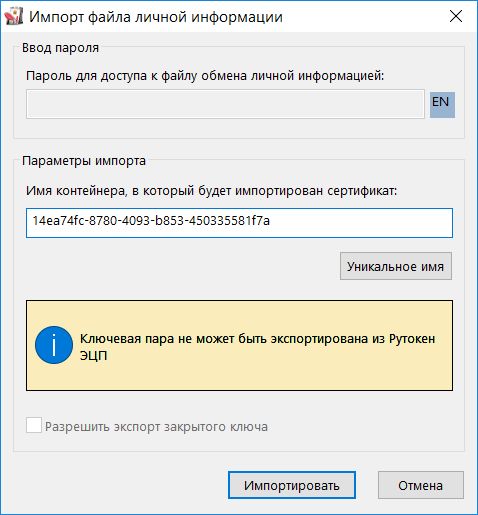
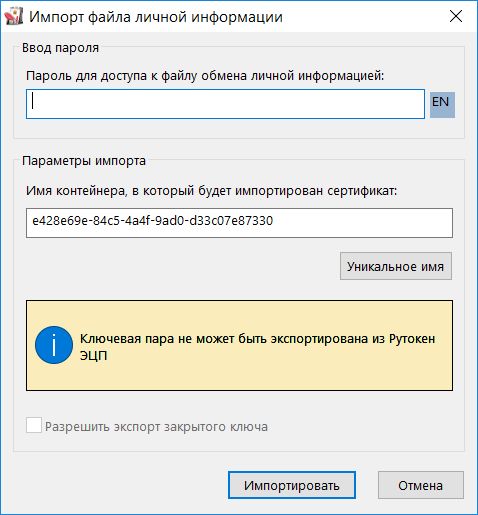
			<content type="html"><![CDATA[<div class="quotebox"><cite>Филиппов Никита пишет:</cite><blockquote><p><strong>unghost</strong>, Добрый день<br />Разработчики порекомендавали воспользоваться данной <a href="https://dev.rutoken.ru/pages/viewpage.action?pageId=4227146">статьей</a></p></blockquote></div><p>У меня Windows, а не Linux.</p><div class="quotebox"><blockquote><p>но появились вопросы относительно конечной целы ваших действий, можете описать подробнее?</p></blockquote></div><p>Целью является удалённый доступ к сети через межсетевой экран, для чего используется RSA-сертификат и ключ на токене.</p><p>Описываю подробнее на примере. На OpenSSL:<br />1) Генерируем ключ:<br />c:\OpenSSL-Win64\bin\openssl.exe genrsa -out test.key 2048<br />2) Выпускаем сертификат:<br />C:\OpenSSL-Win64\bin\openssl.exe req -x509 -new -key test.key -days 1024 -out test.cer -utf8 -nodes -config test.cnf<br />Файл test.cnf выглядит так:<br /></p><div class="codebox"><pre><code>[req]
default_bits = 2048
distinguished_name = dn

[dn]
0.domainComponent = &quot;ru&quot;
0.domainComponent_default = &quot;ru&quot;
commonName = &quot;Тест Тестович&quot;
commonName_default = &quot;Тест Тестович&quot;
commonName_max = 256</code></pre></div><p>3) Создаем pfx-файл:<br />c:\OpenSSL-Win64\bin\openssl.exe pkcs12 -export -inkey test.key -in test.cer -out test.pfx<br />&nbsp; &nbsp; &nbsp; &nbsp; &nbsp; &nbsp; &nbsp; &nbsp; &nbsp; &nbsp;<br />При попытке импорта pfx-файла, созданного через OpenSSL 1.1.1, в Rutoken через &quot;Панель управления - Сертификаты - Импортировать&quot; всё прекрасно:</p><p><span class="postimg"><a class="fancybox fancybox.image" rel="group" href="https://forum.rutoken.ru/uploads/images/2024/11/41aca8bce2d5afb240284464d249274f.jpg"><img class="fb_img" src="https://forum.rutoken.ru/uploads/previews/2024/11/41aca8bce2d5afb240284464d249274f.jpg" alt="" /></a></span> </p><p>При попытке импорта pfx-файла в Rutoken, созданного через OpenSSL 3.0, через &quot;Панель управления - Сертификаты - Импортировать&quot; всё нехорошо - почему-то запрашивается пароль:</p><p><span class="postimg"><a class="fancybox fancybox.image" rel="group" href="https://forum.rutoken.ru/uploads/images/2024/11/8fae3227c00d2476584b5794dbca3bcb.jpg"><img class="fb_img" src="https://forum.rutoken.ru/uploads/previews/2024/11/8fae3227c00d2476584b5794dbca3bcb.jpg" alt="" /></a></span> </p><p>Пустой пароль не проходит:</p><p><span class="postimg"><a class="fancybox fancybox.image" rel="group" href="https://forum.rutoken.ru/uploads/images/2024/11/4e4f8c9b44742a6b7078fa88099e14d5.jpg"><img class="fb_img" src="https://forum.rutoken.ru/uploads/previews/2024/11/4e4f8c9b44742a6b7078fa88099e14d5.jpg" alt="" /></a></span> </p><p>pfx-файл, созданный через OpenSSL 1.1.1 <a href="https://disk.yandex.ru/d/FiNvDKknPYdofg">можно скачать здесь</a><br />pfx-файл, созданный через OpenSSL 3.0 <a href="https://disk.yandex.ru/d/Xu5wl1j-_1DPJA">можно скачать здесь</a></p>]]></content>
			<author>
				<name><![CDATA[unghost]]></name>
				<uri>https://forum.rutoken.ru/user/16072/</uri>
			</author>
			<updated>2024-11-18T14:07:33Z</updated>
			<id>https://forum.rutoken.ru/post/26534/#p26534</id>
		</entry>
		<entry>
			<title type="html"><![CDATA[Re: Импорт в Рутокен ЭЦП 3.0 RSA-ключей pkcs12 созданных в OpenSSL 3.0]]></title>
			<link rel="alternate" href="https://forum.rutoken.ru/post/26533/#p26533" />
			<content type="html"><![CDATA[<p><strong>unghost</strong>, Добрый день<br />Разработчики порекомендавали воспользоваться данной <a href="https://dev.rutoken.ru/pages/viewpage.action?pageId=4227146">статьей</a>, но появились вопросы относительно конечной целы ваших действий, можете описать подробнее?</p>]]></content>
			<author>
				<name><![CDATA[Филиппов Никита]]></name>
				<uri>https://forum.rutoken.ru/user/15532/</uri>
			</author>
			<updated>2024-11-15T10:13:05Z</updated>
			<id>https://forum.rutoken.ru/post/26533/#p26533</id>
		</entry>
		<entry>
			<title type="html"><![CDATA[Импорт в Рутокен ЭЦП 3.0 RSA-ключей pkcs12 созданных в OpenSSL 3.0]]></title>
			<link rel="alternate" href="https://forum.rutoken.ru/post/26530/#p26530" />
			<content type="html"><![CDATA[<p>Добрый день!<br />Много лет создавал RSA-ключи в формате pkcs12 посредством OpenSSL 1.1.1 и импортировал их в Рутокен ЭЦП 3.0. Всё было нормально и прекрасно работало.<br />Теперь OpenSSL 1.1.1 снят с поддержки, и я решил попробовать OpenSSL 3.0. Импорт таких ключей в Рутокен ЭЦП 3.0 более не работает. При импорте такого файла почему-то запрашивается пароль, хотя файл pkcs12 был создан без пароля.<br />Стал копаться и выяснил, что OpenSSL 3.0 по умолчанию создает файл pkcs12 в формате AES:</p><div class="codebox"><pre><code>c:\OpenSSL-Win64-3.0\bin\openssl.exe pkcs12 -info -in new.pfx
Enter Import Password:
MAC: sha256, Iteration 2048
MAC length: 32, salt length: 8
PKCS7 Encrypted data: PBES2, PBKDF2, AES-256-CBC, Iteration 2048, PRF hmacWithSHA256
Certificate bag
Bag Attributes
........
PKCS7 Data
Shrouded Keybag: PBES2, PBKDF2, AES-256-CBC, Iteration 2048, PRF hmacWithSHA256
Bag Attributes
    localKeyID: 00 37 4E 49 8C 65 60 46 21 DA 9B E4 0D 24 0E 0B 4C 34 91 DB
Key Attributes: &lt;No Attributes&gt;</code></pre></div><p> </p><p>А OpenSSL 1.1.1 по умолчанию создает файл pkcs12 в формате 3DES:</p><div class="codebox"><pre><code>c:\OpenSSL-Win64\bin\openssl.exe pkcs12 -info -in new.pfx
Enter Import Password:
MAC: sha1, Iteration 2048
MAC length: 20, salt length: 8
PKCS7 Encrypted data: pbeWithSHA1And40BitRC2-CBC, Iteration 2048
Certificate bag
Bag Attributes
.....
PKCS7 Data
Shrouded Keybag: pbeWithSHA1And3-KeyTripleDES-CBC, Iteration 2048
Bag Attributes
    localKeyID: 00 37 4E 49 8C 65 60 46 21 DA 9B E4 0D 24 0E 0B 4C 34 91 DB
Key Attributes: &lt;No Attributes&gt;</code></pre></div><p>Я правильно понимаю, что в Рутокен ЭЦП 3.0 невозможно импортировать RSA-ключ pkcs12 зашифрованный в формате AES? Это ограничение драйверов или самого токена?<br />Модель Рутокена -&nbsp; Рутокен ЭЦП 3.0 (3220).</p>]]></content>
			<author>
				<name><![CDATA[unghost]]></name>
				<uri>https://forum.rutoken.ru/user/16072/</uri>
			</author>
			<updated>2024-11-14T13:59:48Z</updated>
			<id>https://forum.rutoken.ru/post/26530/#p26530</id>
		</entry>
</feed>